
| Brand | TP-link |
| Manufacturer | Platinum Selection |
| Model Number | RE220 |
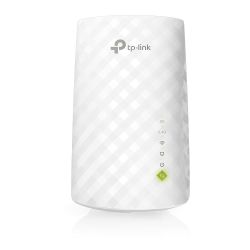
AC750 Wi-Fi Range Extender Boosts wireless signal to previously unreachable or hard-to-wire areas flawlesslyCompatible with 802.11 b/g/n and 802.11ac Wi-Fi devicesDual-band speeds up to 750MbpsMiniature size and wall-mounted design make it easy to deploy and move flexiblyEthernet port allows the Extender to function as a wireless adapter to connect wired devices Eliminate Wi-Fi Dead Spots Extend High-Speed Wi-Fi Across Your HomeAC750 Wi-Fi Range Extender Boost Your Wi-Fi to hard-to-reach AreasPlace the RE220 between your wireless router and wireless devices, expanding Wi-Fi coverage while eliminating Wi-Fi dead zones.
The dual-band Wi-Fi up to 750 Mbps can not only extend to 32,00 sq. ft. (300m2) with the router, but also make good use of your high ISP speed, ideal for HD video streaming, online gaming, and other bandwidth-intensive tasks. Stable Dual Band Connection for More DevicesThe RE220s Wireless AC technology creates faster and stronger Wi-Fi connections across your home and extends dual-band Wi-Fi up to 750 Mbps.
Dual 2.4 GHz and 5 GHz bands provide Wi-Fi connections to up to 32 devices, allowing you to enjoy a stable and drop-free experience on all your devices. Simple Two-Step SetupStep 1: Press the WPS button on the router and RE220 to easily connect the extender to the network. Or connect the extender via the Tether app or Web UI if your router doesnt support WPS.Step 2: Relocate the extender to a better location for optimal Wi-Fi coverage with the help of the smart signal indicator light.
An Access Point as well as a Wireless AdapterThe Ethernet port of RE220 can easily turn your wired Internet connection into a wireless access point. And it can also function as a wireless adapter to connect wired devices. High-Speed Mode for Maximized PerformanceHigh-Speed Mode uses one dedicated Wi-Fi band as backhaul and another dedicated Wi-Fi band as an access point to maximize the bandwidth on extender Wi-Fi.
Universal CompatibilityThe RE220 is compatible with any of your existing Wi-Fi router or access point, making it easy to expand and strengthen your Wi-Fi network. Smart Management by Tether AppSet up and manage your Wi-Fi through the TP-Link Tether app on your smartphone (Android, iOS). Specifications Hardware Features Plug Type: EU, UK, US, AUStandards and Protocols: IEEE802.11ac,IEEE 802.11n, IEEE 802.11g, IEEE 802.11bInterface: 1 x 10/100M Ethernet Port (RJ45)Button: RE (Range Extender) Button, Reset ButtonPower Consumption: About 6.5WDimensions ( W x D x H ): 4.3x 2.6 x 3.0in. (110.0 x 65.8 x 75.2mm)Antenna: 3 x internal Wireless Features Frequency: 2.4GHz & 5GHz Signal Rate:5GHz: Up to 433Mbps2.4GHz: Up to 300Mpbs Reception Sensitivity:2.4G:270M: -70dBm@10% PER130M: -70dBm@10% PER108M: -73dBm@10% PER54M: -75dBm@10% PER11M: -86dBm@8% PER6M: -92dBm@10% PER1M: -94dBm@8% PER5G:390M: -60dBm@10% PER29.3M: -83dBm@10% PER180M: -64dBm@10% PER13.5M: -87dBm@10% PER78M: -68dBm@10% PER6.5M: -90dBm@10% PER54M: -75dBm@10% PER6M?-90dBm@10% PER Transmit Power: < 20 dBm (EIRP)Wireless Modes: Range Extender Wireless Functions:WMM (Wi-Fi Multimedia)Wireless StatisticDomain Login Function Wireless Security:64/128/152-bit WEPWPA-PSK / WPA2-PSK Others: Certification: CE, FCC, RoHSSystem Requirements: Microsoft Windows 98SE, NT, 2000, XP, Vista or Windows 7, 8, 10, Mac OS, NetWare, UNIX, or Linux.
Environment:Operating Temperature: 0C~40C (32F~104F)Storage Temperature: -40C~70C (-40F~158F)Operating Humidity: 10%~90% non-condensingStorage Humidity: 5%~90% non-condensing What's in the box1 x AC750 Wi-Fi Range Extender RE2001 x Quick Installation Guide
 Related Products
Loading similar products...
Stay informed about the best deals and price drops. Choose which notifications you'd like to receive from PriceCheck.



